
Healthcare Duress Alerting Systems: What to Evaluate Before You Buy
Key Takeaways
- Most healthcare duress alerting systems were built for asset tracking or patient monitoring first, so the architecture underneath, not the feature list, determines whether the system works when a staff member actually needs it
- The traits that separate a credible system from a demo-room product aren't optional upgrades: network independence, silent activation, room-level location, battery-powered infrastructure, and privacy-first design are baseline requirements
- Before shortlisting vendors, ask them to demonstrate coverage in your worst dead zone, share their false alarm rates, and explain what the first 30 days after installation include
Most of what you'll evaluate wasn't built for this. These systems started as asset trackers or patient monitors, and the panic button got added later. That matters more than any feature list. A system built for a different job carries that job's weaknesses into yours: the Wi-Fi dependency, the continuous tracking, the six-month deployment timeline. The wrong choice won't show up until someone needs help and nothing happens.
Never buy a duress system you haven't tested in your facility's worst dead zone. If the vendor won't do that walkthrough, they already know the answer.
What Is Duress Alerting in Healthcare?
If you're searching for a duress alerting system, something already pushed you here. An incident. A near-miss. A regulatory audit. A staffing crisis where safety became the reason people quit.
Healthcare duress alerting is a specific capability: a personal, silent, location-aware alert activated when de-escalation has failed and a staff member needs immediate help.
| Healthcare Duress Alerting | How It Differs |
|---|---|
| Nurse call | Routes clinical requests, not personal safety alerts |
| Overhead codes | Broadcasts to the entire facility, alerting the aggressor |
| General security infrastructure | Monitors spaces rather than protecting individuals |
No U.S. state has a universal mandate requiring all hospitals to issue wearable panic buttons, but the direction is clear. New York's SB S5294B requires general hospitals and nursing homes to build workplace-violence prevention programs with security measures matching each facility's risk profile. Even where the law doesn't name panic buttons, it requires the capability a duress system provides.
You're choosing a system that needs to satisfy today's requirements and tomorrow's mandates.
What a Credible Healthcare Duress System Looks Like
Most vendor comparisons start with features. This one starts with failure modes, because the traits that matter are the ones that prevent the failures buyers discover after the contract is signed.
Some facilities genuinely don't need a dedicated duress system. A small outpatient clinic with clear sightlines and low-acuity patients may find existing security measures sufficient. This framework matters most for facilities with complex layouts, high-acuity populations, 24-hour operations, or documented violence history.
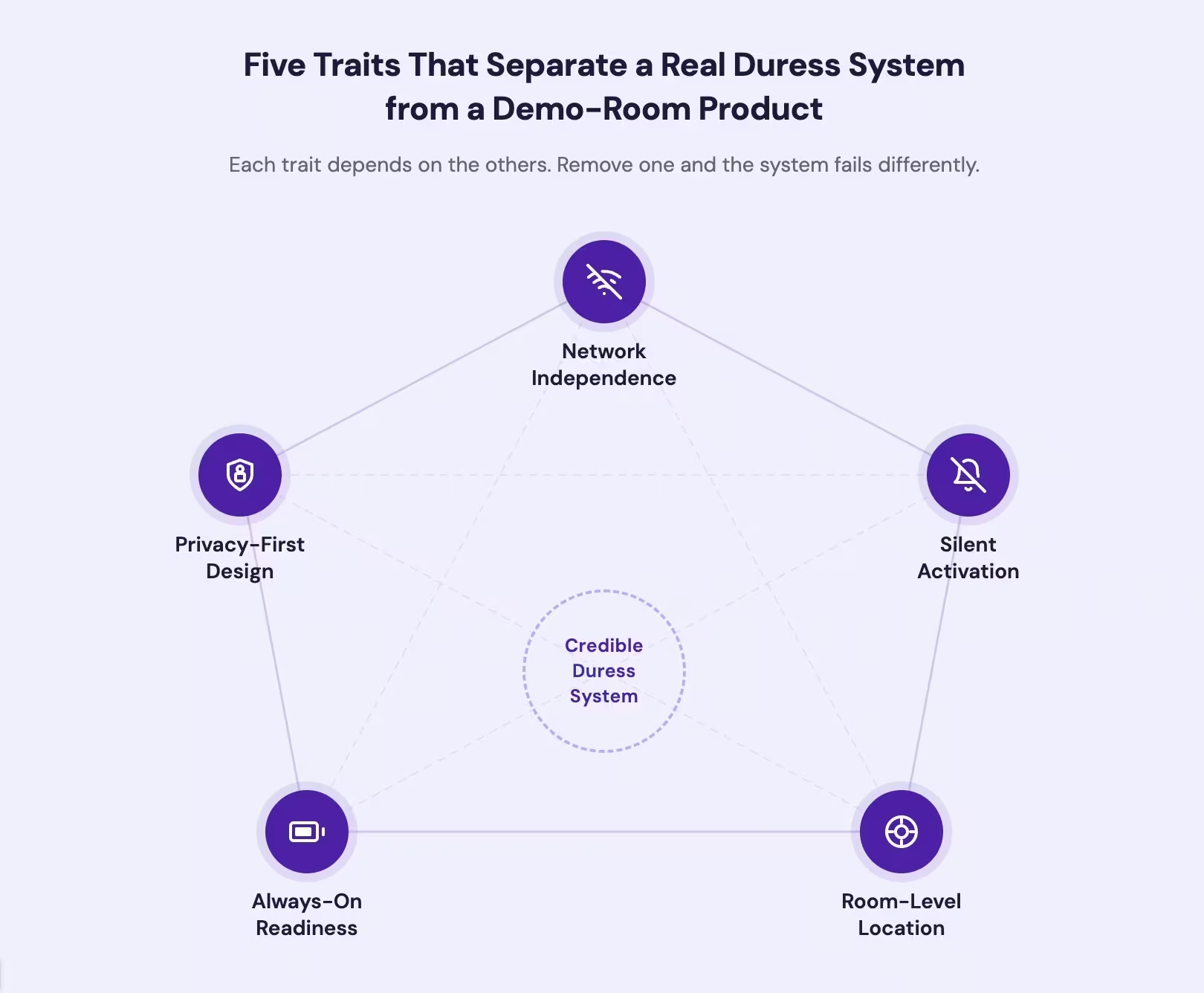
Five traits separate a system built for real duress from one that works in a demo room. These aren't differentiators. They're non-negotiables.
| Architectural Trait | Why It Matters Under Duress |
|---|---|
| Network independence | Operates on its own network, not facility Wi-Fi. Keeps working in dead zones and in areas the hospital LAN doesn't reach. |
| Silent activation | Produces no sound that alerts the aggressor. A loud alarm in a room with a violent individual escalates the situation. A duress button that makes noise when activated tells the aggressor the worker just called for help. |
| Room-level location | Tells responders which room, not just which floor. Responders searching a hallway lose the minutes that matter most. |
| Battery-powered infrastructure | Beacons and buttons run on batteries, not wall power. A wall-powered sensor network can be physically unplugged and disabled. A dead battery is a maintenance issue. An unplugged sensor is a tamper vulnerability. |
| Privacy-first design | Tracks location only when the button is pressed. No continuous monitoring of staff movement throughout a shift. |
These aren't premium features. They're the baseline. Any vendor that frames network independence or silent activation as an upgrade is telling you where their engineering priorities sit.
See how a standalone duress alerting system meets these architectural requirements
Poorly lit corridors, isolated rooms, and parking lots are where assault risk is highest [1]. Across 154 U.S. hospital shootings, 41% occurred on hospital grounds, and 23% in parking areas or emergency department ramps [2]. A system on facility Wi-Fi doesn't fail randomly. It fails precisely where the risk is greatest. A system on wall power doesn't just fail during outages. It loses its entire coverage map simultaneously, in every room, at the exact moment the building is most chaotic.
Network independence and power independence aren't technical preferences. They're the first two questions that should eliminate vendors from your list. Ask every vendor: what happens to your system when the Wi-Fi goes down? What happens when the building loses power?
Our duress system runs on its own wireless network. Location activates only when the button is pressed.
Contact UsTypes of Healthcare Duress Alerting Systems
The badge on the outside looks similar across system types. The architecture underneath is what matters. A system that started as something else will always prioritize what it was built for. A vendor that sells duress alerting alongside asset tracking, patient monitoring, and a dozen other services gives safety a fraction of their engineering attention. Ask how much of their R&D is dedicated to the duress function specifically.
RTLS-bundled systems are the most common option buyers encounter first, because the vendors are large and already inside the hospital. These systems add duress alerting on top of a location tracking platform built for asset management:
- Staff badges are tracked continuously throughout every shift
- Dense reader networks (BLE, Wi-Fi, or UWB) must be installed across the facility
- Location infrastructure is mains-powered and ceiling-mounted, meaning a power outage disables the coverage network
- In clinical areas like ICUs, that hardware may require air filtration shutdowns, adding months to deployment
You can't get independent duress coverage from a system that shares its network with asset tracking. Ask the vendor: if your RTLS platform goes down, does our duress system go down with it? If the building loses power, does your location infrastructure stay up?
Standalone badge-based systems operate on their own wireless network using battery-powered beacons. They don't depend on hospital Wi-Fi, building power, or the facility LAN. Location activates only when the button is pressed. Deployment takes weeks, not months. Because the beacons run on batteries, a building-wide power outage doesn't touch the coverage network.
App-based systems run on staff smartphones. They cost less upfront but assume the staff member can reach their phone during a physical confrontation. In behavioral health units where personal devices are restricted, they aren't an option. For what behavioral health environments specifically require, see our guide to the best duress alarms for psychiatric units.
Fixed-mount systems place panic buttons at fixed locations. They provide coverage only where buttons are installed. A staff member cornered elsewhere has no way to alert.
You can't track your staff continuously and expect them to trust the system. In one urban emergency department, the majority of clinical staff didn't wear their personal duress alarm [3]. Among healthcare workers given RTLS tags, physician willingness reached only 63% [4]. Add continuous location tracking and nurses simply decline to wear the device. The system shows full coverage on a dashboard and provides zero protection on the floor.
Where DIY and Commodity Alternatives Fall Short
Some facilities try to close the gap with tools they already have. That instinct makes sense. It introduces failure modes that aren't obvious until an incident exposes them.
Consumer panic buttons send an alert but don't transmit location data to a security operations center. They don't integrate with institutional response protocols.
Repurposed nurse call systems route duress alerts through the same channel as clinical requests and bed alarms. A duress alert buried in routine notifications doesn't get an urgent response.
Smartphone apps face a simpler problem. During a physical confrontation, reaching for a phone, unlocking it, and tapping an app takes coordination that a staff member under attack doesn't have.
A hospital with stairwells, parking garages, behavioral health units, and 24-hour operations can't rely on these. They create a documented safety response that will be examined after an incident and found inadequate.
We deploy across hospitals and distributed sites on a single platform, with on-site training and coverage verification included.
Contact UsHow Do You Activate a Staff Duress Alert?
Activation design sounds like a user-experience detail. It's a safety-critical decision that shapes false alarm volume, usability under stress, and whether the activation itself escalates the situation.
Single-action buttons generate frequent false alarms. Dual-action designs reduce accidental triggers significantly. That matters because false alarms train responders to stop trusting the alerts. The person who actually needs help is alone, not because the system failed, but because nobody believed it.
Activation can't be so complex it fails under adrenaline. A staff member can press a button with a closed fist. Navigating a menu or entering a PIN requires coordination that adrenaline eliminates.
Silent activation matters too: an audible alarm tells the aggressor help has been called.
| Activation Type | False Alarm Risk | Usability Under Stress | Escalation Risk |
|---|---|---|---|
| Single press | High | High | Depends on audible vs. silent |
| Multi-press (deliberate sequence) | Low | High (gross motor) | Low if silent |
| App tap | Low | Low (fine motor, phone retrieval) | Moderate (visible screen) |
| Pull cord (fixed mount) | Low | Moderate (must be near cord) | Low if silent |
Ask vendors for their false alarm data. A vendor confident in its design publishes its rates. A vendor that won't share is telling you something.
What to Evaluate Before You Buy
This checklist turns the failure modes above into the questions that matter.
| Evaluation Area | What to Ask | What the Answer Reveals |
|---|---|---|
| Network dependency | Does the system operate on its own network or depend on facility Wi-Fi? What happens during an outage? | Whether the system works in dead zones, stairwells, parking structures, and during infrastructure failures |
| Power independence | Is the location infrastructure battery-powered or wall-powered? What happens during a building-wide power outage? | Whether the coverage network survives the exact conditions that create chaos in a facility |
| Tracking and privacy | Does the system track staff location continuously or only during an alert? | Whether staff will actually wear the device |
| Coverage verification | How does the vendor prove coverage before you sign? Do they test in your dead zones? | Whether you're buying verified coverage or a promise based on a floor plan |
| Activation design | What is the activation method? What are the documented false alarm rates? | Whether the system balances accidental-trigger prevention with usability under stress |
| Implementation and training | Does the vendor train staff on-site, run response drills, and verify coverage during deployment? | Whether you're getting a deployment partner or a hardware drop-off |
| Multi-site scalability | Can the system cover your main campus and distributed small sites on one platform? | Whether you'll manage one system or five |
Implementation deserves extra weight. A system that arrives in a box with a PDF manual hasn't been deployed. It's been dropped off. Ask what the first 30 days look like:
- On-site staff training with the actual devices
- Live activation drills with the response team
- Coverage verification in your known dead zones
- A named point of contact, not a support ticket queue
If the answer is "we send a link to the training portal," keep looking.
Multi-site scalability matters because most health systems run a mix of large hospitals and dozens of small clinics. A vendor built for large campuses may have no answer for small sites. One platform covering the full network eliminates that gap. Ask the vendor: can you cover my 300-bed hospital and my twelve outpatient clinics on the same dashboard?
Both OSHA and The Joint Commission require the capability these systems provide. Your compliance documentation should come from the system itself: audit trails, response records, and drill logs.
Start with the coverage verification question. Ask every vendor to demonstrate the system in your worst dead zone, not their best demo room.
HEALTHCARE DURESS ALERTING
See the System in Your Worst Dead Zone
Ask us to demonstrate coverage in the stairwells, parking structures, and behavioral health units where other systems lose signal.
References
- https://www.health.state.mn.us/facilities/patientsafety/preventionofviolence/docs/nioshviolenceoccupationalhazhospitals.pdf
- https://www.clinician.com/articles/62762-most-hospital-shootings-are-not-preventable
- https://pubmed.ncbi.nlm.nih.gov/37150562/
- https://academic.oup.com/jamiaopen/article/4/3/ooaa072/6129363